Subscriptions
Subscriptions are the mechanism that connects handlers to message sources. They manage the flow of messages from event stores and message brokers to your handlers, tracking position, handling errors, and ensuring reliable delivery.
What is a Subscription?
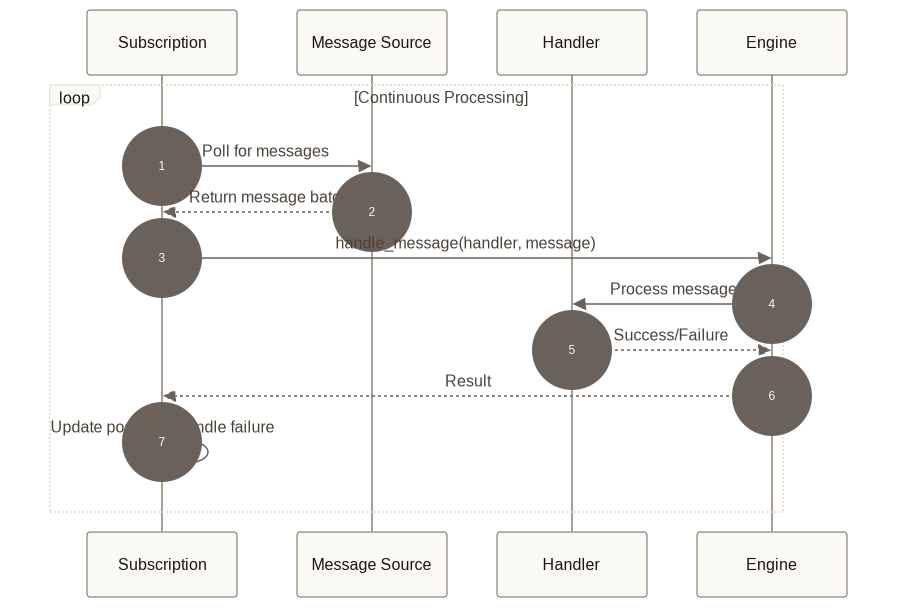
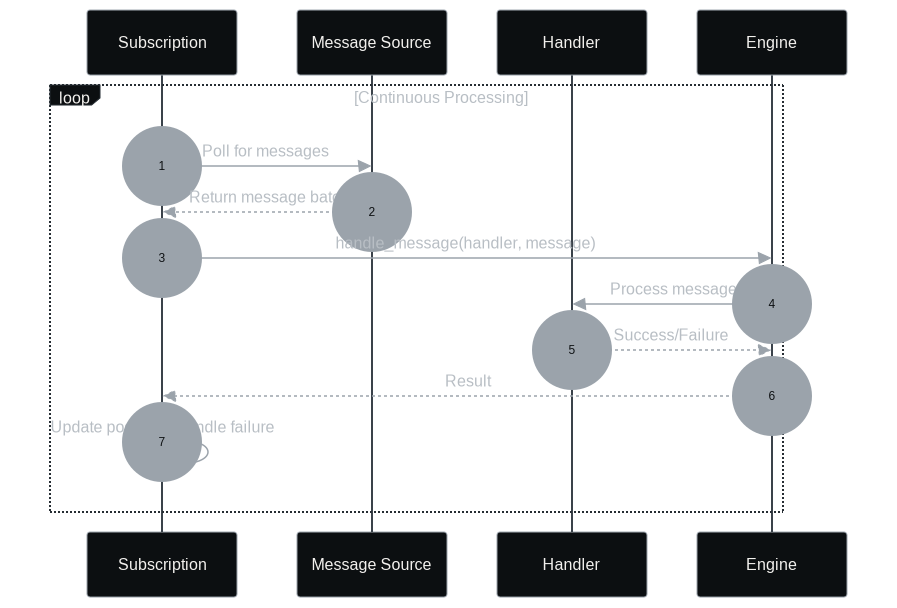
A subscription is a long-running process that:
- Polls for messages from a message source (event store or broker stream)
- Delivers messages to the appropriate handler
- Tracks position to resume from where it left off
- Handles failures with retries and error callbacks
Types of Subscriptions
Protean provides two types of subscriptions:
Handler Subscriptions
Handler subscriptions connect event handlers, command handlers, and projectors to message sources. They can use either:
- StreamSubscription: For production workloads using Redis Streams
- EventStoreSubscription: For reading directly from the event store
The SubscriptionFactory automatically selects the appropriate type based on
configuration.
Broker Subscriptions
Broker subscriptions connect subscribers to external message brokers. They
are used for consuming messages from systems outside your domain. A subscriber
receives each message's payload in its __call__ method:
external_orders = []


@domain.subscriber(broker="default", stream="external_orders")
class ExternalOrderSubscriber:
    def __call__(self, payload: dict) -> None:
        external_orders.append(payload)
Stream Categories
Subscriptions connect handlers to stream categories, which are logical groupings of related messages (events and commands). Stream categories determine how messages are organized and routed from message sources (event stores, brokers) to handlers.
How Subscriptions Use Stream Categories
When you define a handler, it subscribes to a specific stream category:
@domain.aggregate
class Order: ...


@domain.event_handler(part_of=Order)
class OrderEventHandler:
    # Subscribes to Order's stream category ("ecommerce::order")
    ...
The engine creates a subscription that:
- Polls the stream category for new messages
- Delivers messages to the handler
- Tracks the handler's position in the stream
- Handles errors and retries
Default Stream Category Subscription
Handlers automatically subscribe to their associated aggregate's stream category:
@domain.aggregate
class Order: ...  # Stream category: "ecommerce::order"


@domain.event_handler(part_of=Order)
class OrderEventHandler:
    # Automatically subscribes to the "ecommerce::order" stream category
    ...
Custom Stream Category Subscription
Handlers can subscribe to a different stream category. A handler on a shared
stream such as all_orders usually reads every event on it with
@handle("$any"), for a report or an audit log:
report = []


@domain.event_handler(part_of=Order, stream_category="all_orders")
class OrderReportHandler:
    # Subscribes to "ecommerce::all_orders" instead of Order's default

    @handle("$any")
    def record(self, event):
        report.append(event.to_dict())
Cross-Aggregate Coordination
When an Order event must change Inventory, the event handler stays with
Order and subscribes to the order stream. It issues a command that is part
of Inventory, and Inventory's command handler does the write. Take an Order
that raises OrderShipped, and an Inventory that changes through a
ReduceStock command:
@domain.aggregate
class Order:
    product_id: Identifier(required=True)
    quantity: Integer(required=True)

    def ship(self):
        self.raise_(
            OrderShipped(
                order_id=self.id,
                product_id=self.product_id,
                quantity=self.quantity,
            )
        )


@domain.event(part_of=Order)
class OrderShipped:
    order_id: Identifier(required=True)
    product_id: Identifier(required=True)
    quantity: Integer(required=True)


@domain.aggregate
class Inventory:
    product_id: Identifier(identifier=True)
    in_stock: Integer(required=True)
    applied_order_ids: List(content_type=String)

    def reduce_stock(self, order_id, quantity):
        self.in_stock -= quantity
        self.applied_order_ids = [*self.applied_order_ids, order_id]


@domain.command(part_of=Inventory)
class ReduceStock:
    order_id: Identifier(required=True)
    product_id: Identifier(required=True)
    quantity: Integer(required=True)
The event handler on Order issues the command:
@domain.event_handler(part_of=Order)
class OrderEventHandler:
    """Asks Inventory to reduce stock when an order ships."""

    @handle(OrderShipped)
    def reduce_stock(self, event):
        current_domain.process(
            ReduceStock(
                order_id=event.order_id,
                product_id=event.product_id,
                quantity=event.quantity,
            )
        )
protean check reports EVENT_HANDLER_FOREIGN_EVENT for an event handler that
is part of Inventory but handles OrderShipped, an event owned by Order.
The event handlers guide
shows the full example, including the command handler that skips an order it
has already applied.
For comprehensive details on stream categories, including message organization, routing patterns, event sourcing, and best practices, see the Stream Categories guide.
Subscription Lifecycle
Initialization
When a subscription starts, it performs type-specific initialization:
- StreamSubscription: Ensures consumer group exists in Redis
- EventStoreSubscription: Loads last processed position from event store
Polling Loop
Subscriptions run a continuous polling loop:
# fragment
async def poll(self):
    while self.keep_going and not self.engine.shutting_down:
        # Get next batch of messages
        messages = await self.get_next_batch_of_messages()

        if messages:
            # Process the batch
            await self.process_batch(messages)

        # Sleep between ticks: tick_interval, or a longer idle wait for
        # an event-store subscription that read nothing new
        await self._pause_between_ticks()
Message Processing
For each message in a batch:
- Deserialize the message
- Call
engine.handle_message(handler, message) - On success: Acknowledge the message, update position
- On failure: Retry or move to dead letter queue
Shutdown
During shutdown, subscriptions:
- Stop accepting new messages
- Complete processing of current batch
- Persist final position
- Clean up resources
Position Tracking
Subscriptions track their position to ensure messages are not reprocessed after restarts.
EventStoreSubscription Position
EventStoreSubscription stores position in the event store itself:
# fragment
# Position stream name
f"position-{subscriber_name}-{stream_category}"

# Position is stored as a message
{
    "data": {"position": 42},
    "metadata": {"type": "Read", ...}
}
Position is updated periodically based on position_update_interval.
StreamSubscription Position
StreamSubscription uses Redis Streams' built-in consumer group tracking:
- Messages are acknowledged after successful processing
- Pending messages are tracked automatically
- Failed messages can be retried or moved to DLQ
Projection staleness
Because each EventStoreSubscription records its position together with the time that position was written, Protean can tell how far behind a projection is. A projection's staleness is the time since the projector feeding it last advanced while events remained unprocessed. A projection's lag is the number of events still behind the stream head. A projection fed by several projectors is as stale as its worst feeder.
Time-based staleness depends on the position-write timestamp. For this reason,
Protean reports time-based staleness for event-store-backed projectors.
Stream-backed (Redis) projectors report lag but not time-based staleness.
Inspect staleness with protean projection status or the
protean_projection_staleness_seconds metric; see
Monitor the System.
Error Handling
Subscriptions handle errors at multiple levels:
Handler Errors
When a handler raises an exception:
- The exception is logged with full context
- The handler's
handle_errormethod is called (if defined) - The subscription continues processing
Subscription Errors
For transient errors (network issues, etc.):
- Exponential backoff between retries
- Configurable maximum retries
- Dead letter queue for persistent failures (StreamSubscription only)
Fatal Errors
For unrecoverable errors:
- The engine's exception handler is triggered
- Graceful shutdown is initiated
- Exit code indicates failure
Dead Letter Queue Management
Messages that exhaust all retries in a StreamSubscription are moved to a
Dead Letter Queue (DLQ), a separate stream named {stream_category}:dlq. When priority
lanes are enabled, backfill failures go to {stream_category}:backfill:dlq.
DLQ messages retain the original payload along with metadata about why they failed, how many retries were attempted, and which consumer group was processing them. Protean provides two interfaces for inspecting and acting on DLQ messages:
CLI: The protean dlq commands let you list,
inspect, replay, and purge DLQ messages from the terminal:
# See all failed messages
protean dlq list --domain=my_app

# Inspect a specific failure
protean dlq inspect <dlq_id> --domain=my_app

# Replay a single message back to its original stream
protean dlq replay <dlq_id> --domain=my_app

# Replay all messages for a subscription
protean dlq replay-all --subscription=order --domain=my_app

# Clear a subscription's DLQ
protean dlq purge --subscription=order --domain=my_app
Observatory: The Observatory
dashboard includes a DLQ tab that
provides the same capabilities through a web interface. Observatory also
offers REST API endpoints at /api/dlq/* for programmatic access.
Where to go next
- Subscription Types: StreamSubscription in detail vs EventStoreSubscription
- Configuration: Configure subscriptions with profiles and options